PEB Walking: Resolve DLLs export symbols.

PEB
The Process Environment Block (PEB) is a data structure related to each process in user-mode. It holds a significant amount of information, including in-memory loaded modules (DLL/EXE), threads, insights associated to the image loader (Known internally as the Ldr), parameters passed by the user, among other things. Each process owns its own PEB and lives in the user mode VA space of a process. The OS use this information and data structures for internal purposes.
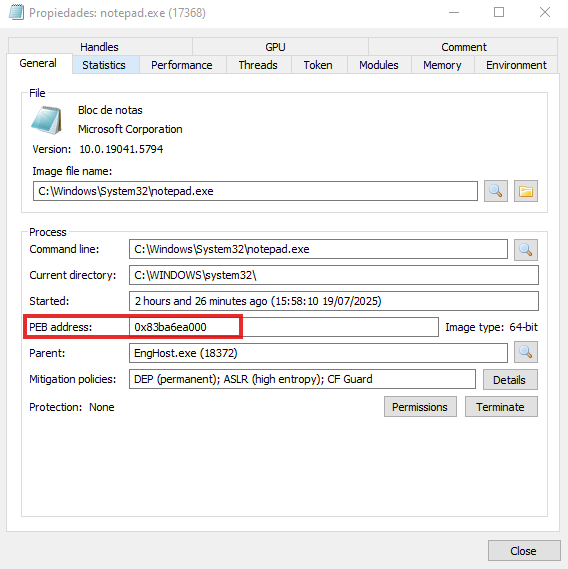 Notepad instance of the PEB base address Process Hacker 2
Within the PEB, there is an Ldr member that points to a PEB_LDR_DATA structure, and its duty is to load modules into memory
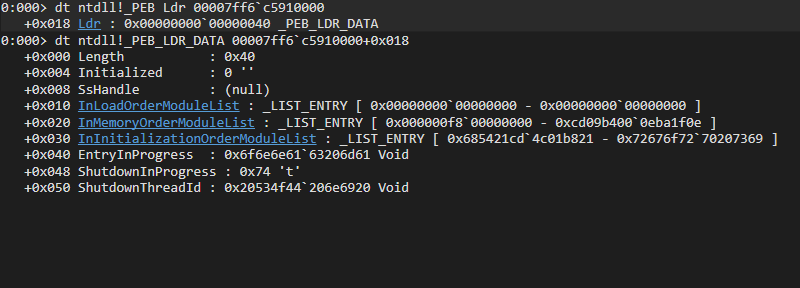 _PEB_LDR_DATA structure in WinDbg
typedef struct _PEB_LDR_DATA
{
    ULONG Length;
    BOOLEAN Initialized;
    HANDLE SsHandle;
    LIST_ENTRY InLoadOrderModuleList;
    LIST_ENTRY InMemoryOrderModuleList;
    LIST_ENTRY InInitializationOrderModuleList;
    PVOID EntryInProgress;
    BOOLEAN ShutdownInProgress;
    HANDLE ShutdownThreadId;
} PEB_LDR_DATA, *PPEB_LDR_DATA;
https://ntdoc.m417z.com/peb_ldr_data
If we want to determine which functions are exported by a PE file (DLL or EXE), the first step is to identify the module’s base address (e.g., ntdll.dll, kernel32.dll, etc.). In WinDbg, we can use the lm command to list all modules loaded in the process’s virtual address space.
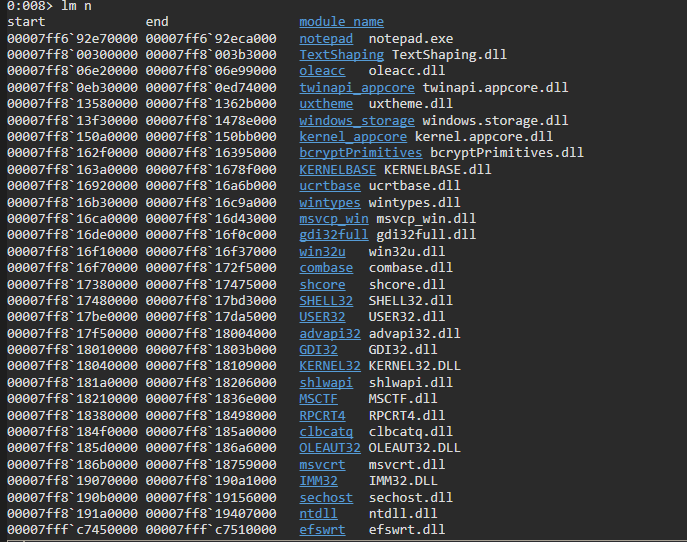 lm Command in Windbg
Export Table
At this point, we know that a PE file loads modules into memory. The next step is to enumerate the exported functions provided by a DLL, if any exist. These functions are described in the Export Table of the PE file. In practice, a PE file maps DLLs into its virtual address space in order to import and invoke functions exported by them. For example, to call the CreateFileW API, the process must first load KERNEL32.DLL into its address space.
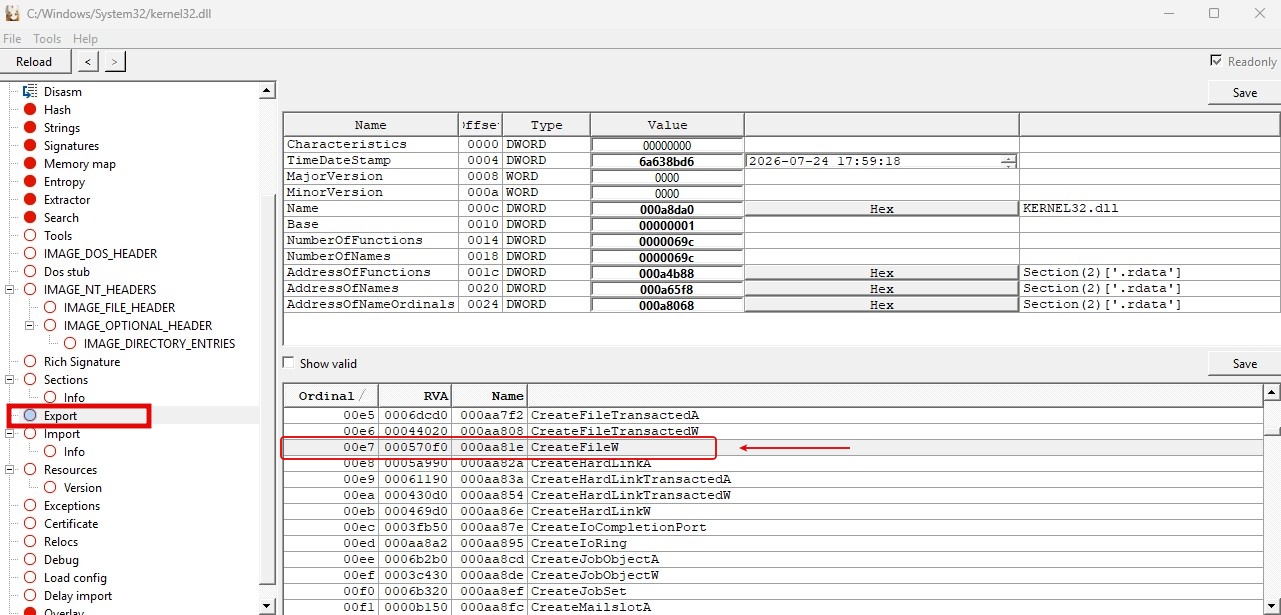 Screenshot of export fucntions in XPEviewer
In the above screenshot, I’m using an kernel32.dll file as an example. At the time of writing this post, there are 1,692 entries. The export table is a data structure IMAGE_EXPORT_DIRECTORY, and it’s found in the first array member of Data Directory, that is, 0 member. The Data Directory it’s an array data structure _IMAGE_DATA_DIRECTORY and has 16 members.
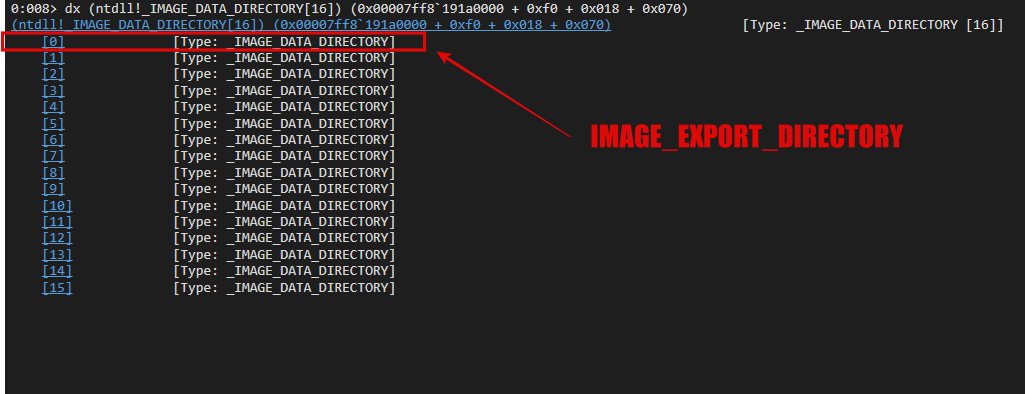 Data Directory array: 0 is Export Directory
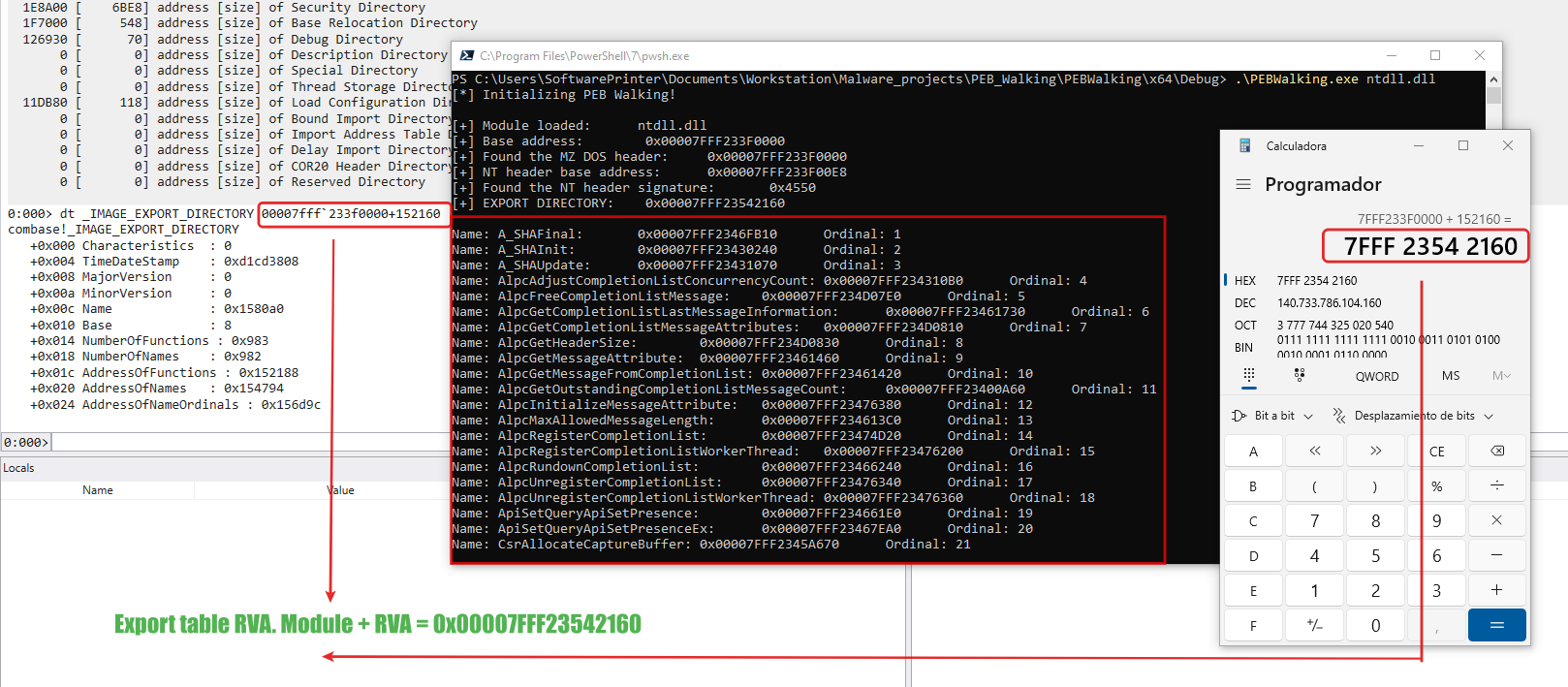
To resolve the export table’s location, the first step is to obtain its RVA from the data directory and add it to the module’s base address. Although this is trivial in WinDbg or with third-party tools, the process differs when implementing it programmatically.
0:008> dt (ntdll!_IMAGE_DATA_DIRECTORY[0]) (0x00007ff8`191a0000 + 0xf0 + 0x018 + 0x070) VirtualAddress
[0] +0x000 VirtualAddress : 0x1b8110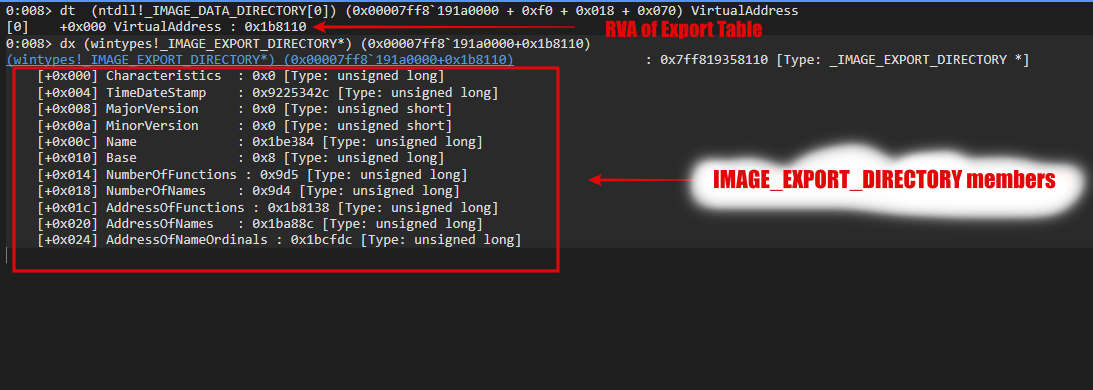 _IMAGE_EXPORT_DIRECTORY members
Walking the PEB format
To programmatically resolve the RVA of a PE (DLL/EXE) file’s export table, the first step we must to do is search for the e_lfanew member in the DOS header. This header is a IMAGE_DOS_HEADER structure. The e_lfanew member contains the file offset of the NT headers.
//0x40 bytes (sizeof)
struct _IMAGE_DOS_HEADER
{
    USHORT e_magic;                                                         //0x0
    USHORT e_cblp;                                                          //0x2
    USHORT e_cp;                                                            //0x4
    USHORT e_crlc;                                                          //0x6
    USHORT e_cparhdr;                                                       //0x8
    USHORT e_minalloc;                                                      //0xa
    USHORT e_maxalloc;                                                      //0xc
    USHORT e_ss;                                                            //0xe
    USHORT e_sp;                                                            //0x10
    USHORT e_csum;                                                          //0x12
    USHORT e_ip;                                                            //0x14
    USHORT e_cs;                                                            //0x16
    USHORT e_lfarlc;                                                        //0x18
    USHORT e_ovno;                                                          //0x1a
    USHORT e_res[4];                                                        //0x1c
    USHORT e_oemid;                                                         //0x24
    USHORT e_oeminfo;                                                       //0x26
    USHORT e_res2[10];                                                      //0x28
    LONG e_lfanew;                                                          //0x3c
};
https://www.vergiliusproject.com/kernels/x86/windows-8/rtm/_IMAGE_DOS_HEADER
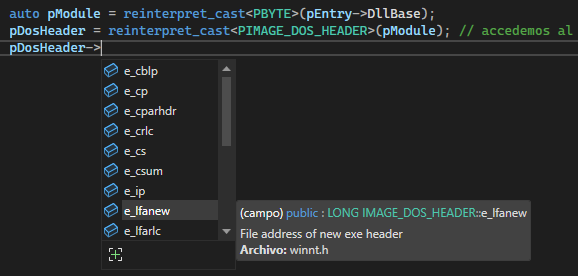 Dos Header members
From the DOS header, we add the e_lfanew offset to the module’s base address (e.g., ntdll.dll, KERNEL32.DLL) to locate the NT headers, which are represented by the IMAGE_NT_HEADERS structure. At this stage, the member of interest is OptionalHeader, which is defined by the IMAGE_OPTIONAL_HEADER64 structure.
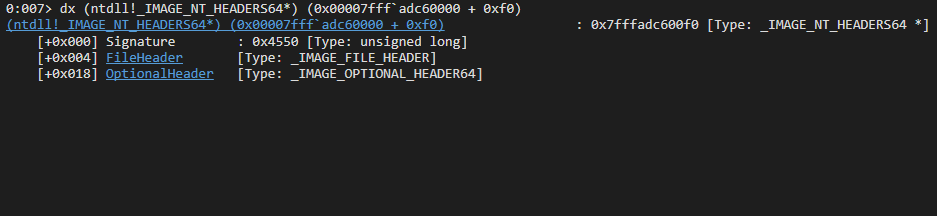
The IMAGE_OPTIONAL_HEADER64 structure contains 30 members. The member of interest is DataDirectory, which is an array of structures. This array contains 16 entries, and the first entry points to the module’s export table.
typedef struct _IMAGE_OPTIONAL_HEADER64 {
 WORD        Magic;
 BYTE        MajorLinkerVersion;
 BYTE        MinorLinkerVersion;
 DWORD       SizeOfCode;
 DWORD       SizeOfInitializedData;
 DWORD       SizeOfUninitializedData;
 DWORD       AddressOfEntryPoint;
 DWORD       BaseOfCode;
 ULONGLONG   ImageBase;
 DWORD       SectionAlignment;
 DWORD       FileAlignment;
 WORD        MajorOperatingSystemVersion;
 WORD        MinorOperatingSystemVersion;
 WORD        MajorImageVersion;
 WORD        MinorImageVersion;
 WORD        MajorSubsystemVersion;
 WORD        MinorSubsystemVersion;
 DWORD       Win32VersionValue;
 DWORD       SizeOfImage;
 DWORD       SizeOfHeaders;
 DWORD       CheckSum;
 WORD        Subsystem;
 WORD        DllCharacteristics;
 ULONGLONG   SizeOfStackReserve;
 ULONGLONG   SizeOfStackCommit;
 ULONGLONG   SizeOfHeapReserve;
 ULONGLONG   SizeOfHeapCommit;
 DWORD       LoaderFlags;
 DWORD       NumberOfRvaAndSizes;
 IMAGE_DATA_DIRECTORY DataDirectory[IMAGE_NUMBEROF_DIRECTORY_ENTRIES];
} IMAGE_OPTIONAL_HEADER64, *PIMAGE_OPTIONAL_HEADER64;
https://learn.microsoft.com/en-us/windows/win32/api/winnt/ns-winnt-image_optional_header32#remarks
As mentioned earlier, the data directory is an array of IMAGE_DATA_DIRECTORY structures, which contain 16 entries. The first entry (index 0) corresponds to the export table. Each member of this array holds the RVA of a critical structure, such as the export table or the import table.
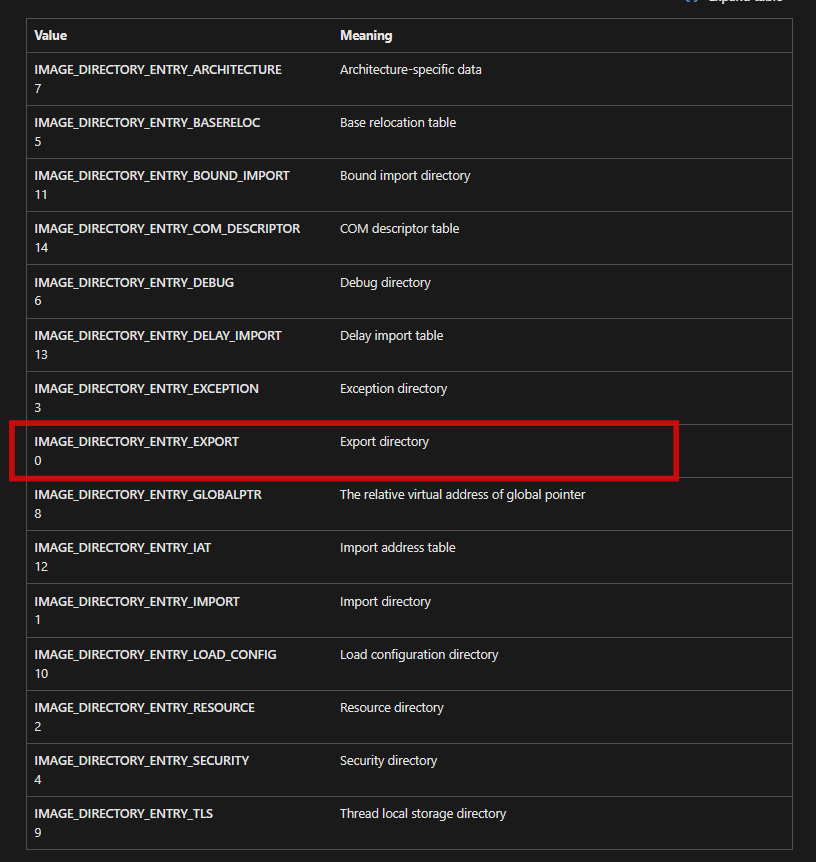 https://learn.microsoft.com/en-us/windows/win32/api/dbghelp/nf-dbghelp-imagedirectoryentrytodata
Microsoft provides a set of macros for accessing directory data. In this case, I’ll use IMAGE_DIRECTORY_ENTRY_EXPORT to retrieve the RVA from the export table. I then add it to the module’s base address.
auto pImgExportDir = reinterpret_cast<PIMAGE_EXPORT_DIRECTORY>(pModule + pNtHeaders64->OptionalHeader.DataDirectory[IMAGE_DIRECTORY_ENTRY_EXPORT].VirtualAddress);
std::wcout << L"[+] EXPORT DIRECTORY:\t 0x" << pImgExportDir << "\n\n";

auto symbols = reinterpret_cast<PDWORD>(pModule + pImgExportDir->AddressOfNames);
auto addrNames = reinterpret_cast<PDWORD>(pModule + pImgExportDir->AddressOfFunctions);
auto numberNames = pImgExportDir->NumberOfNames;
auto ord = reinterpret_cast<PWORD>(pModule + pImgExportDir->AddressOfNameOrdinals);
typedef struct _IMAGE_EXPORT_DIRECTORY {
DWORD Characteristics;
DWORD TimeDateStamp;
WORD MajorVersion;
WORD MinorVersion;
DWORD Name;
DWORD Base;
DWORD NumberOfFunctions;
DWORD NumberOfNames;
DWORD AddressOfFunctions; // RVA from base of image
DWORD AddressOfNames; // RVA from base of image
DWORD AddressOfNameOrdinals; // RVA from base of image
};
https://ghidra.re/ghidra_docs/api/ghidra/app/util/bin/format/pe/ExportDataDirectory.html
In this context, the most important members for us are AddressOfNames, AddressOfFunctions, NumberOfNames, AddressOfNameOrdinals.
- NumberOfNames: This is the total number of symbols exported by name in the PE file. It’s important to note that not all symbols/functions have names.
- AddressOfFunctions: It’s the RVA that points to an array of module symbols.
- AddressOfNames: Points to an array of symbols name into module.
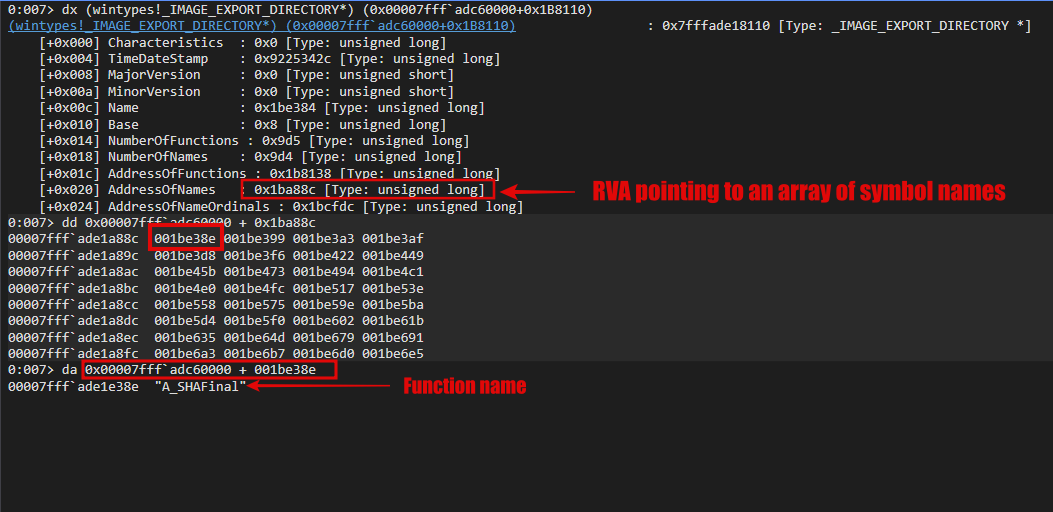
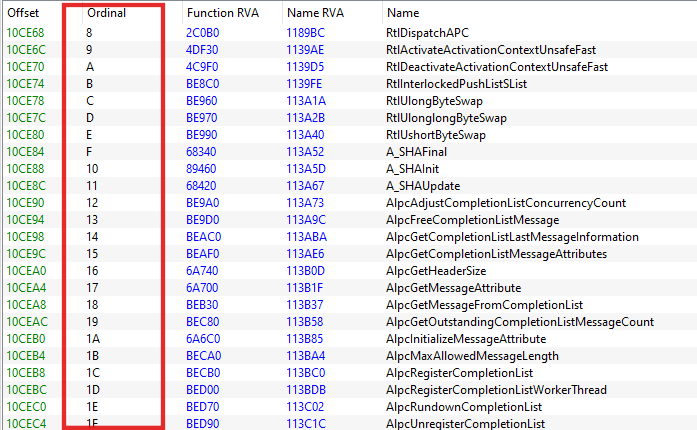
- AddressOfNameOrdinals: An array that holds the
ordinalvalues corresponding to the symbol names listed in the AddressOfNames array.
So, the approach to get the symbols of some modules from the export table at runtime is the following:
- Module base address: Find out the module base address, for instance, ntdll.dll, KERNEL32.DLL, etc.
- MS DOS header: Get the member e_elfanew offset in the MS DOS header (IMAGE_DOS_HEADER). Recall that this member is the gate to NT header.
- NT header: The field
OptionalHeaderis a IMAGE_OPTIONAL_HEADER64 struct, and it holds the data directory array. Remember that the first member in this array is the export directory. It contain the RVA to the struct IMAGE_EXPORT_DIRECTORY.
Full code
//  En este proyecto haremos un PEB walking  para enumerar los modulos cargados y nombres de funciones.
//  Usaremos el metodo de lectura de memoria a traves un offset relativo para conseguir la direccion de PEB directamente
//  El PEB contiene informacion jugosa de un proceso del modo suario.

#include <phnt_windows.h>
#include <phnt.h>
#include <iostream>
#define PHNT_MODE PHNT_MODE_USER

//  Otro metodo es usanado inline assembly, pero solo funciona para 32-bit
//  https://learn.microsoft.com/en-us/cpp/assembler/inline/inline-assembler?view=msvc-170

// Creare una pequeña funcion para convertir strings de tipo ancho de minusculas a mayusculas
// y asi poder hacer una comprabacion adecuada de strings sin problemas.

constexpr std::wstring ToUpperString(const std::wstring& str)
{
    std::wstring wstrUpperStr;
    for (int i = 0; i < str.length(); i++)
        wstrUpperStr.push_back( towupper(str[i]) );

    return wstrUpperStr.data();
}


int wmain(int argc, const PWCHAR Module[])
{

    if (argc < 2)
    {
        std::cerr << "[-] Sorry, no module was provided!" << std::endl;
        return 1;
    }

    // https://learn.microsoft.com/en-us/cpp/intrinsics/readgsbyte-readgsdword-readgsqword-readgsword?view=msvc-170
    auto pPeb = reinterpret_cast<PPEB>(__readgsqword(0x60));
    auto Head = &pPeb->Ldr->InMemoryOrderModuleList;
    auto Current = Head->Flink;

    PLDR_DATA_TABLE_ENTRY   pEntry{ nullptr };
    PIMAGE_DOS_HEADER       pDosHeader{ nullptr };
    PIMAGE_NT_HEADERS64     pNtHeaders64{ nullptr };

    std::cout << "[*] Initializing PEB Walking!\n\n" ;

    while (Current != Head)
    {
        // Calcular el inicio del LDR_DATA_TABLE_ENTRY
        // la macro CONTAINING_RECORD calcula la direcion base de cualquier tipo de estructura determinada , asi como un campo dentro de ella.
        // https://learn.microsoft.com/en-us/windows/win32/api/ntdef/nf-ntdef-containing_record
        pEntry = CONTAINING_RECORD(Current, LDR_DATA_TABLE_ENTRY, InMemoryOrderLinks);

        /*
            Iterar a traves del array de modulos cargados hasta encontrar ntdll.dll.
            Para tratar con strings:
                https://learn.microsoft.com/en-us/cpp/c-runtime-library/reference/strnlen-strnlen-s?view=msvc-170
                https://learn.microsoft.com/en-us/cpp/c-runtime-library/reference/strcmp-wcscmp-mbscmp?view=msvc-170
        */

        if (_wcsicmp(ToUpperString(pEntry->BaseDllName.Buffer).data(), ToUpperString(Module[1]).data()) == 0)
        {
            // Usare reinterpret cast para convertir el tipo PVOID de DllBase a PBYTE y asi poder hacer operaciones aritmeticas byte a byte
            // sin necesidad de estar haciendo conversion de tipo explicita en varias ocaciones

            auto pModule = reinterpret_cast<PBYTE>(pEntry->DllBase);

            // accedemos al header MZ DOS de ntdll.dll para verificar que su firma sea correcta sea correcta
            pDosHeader = reinterpret_cast<PIMAGE_DOS_HEADER>(pModule);

            if (pDosHeader->e_magic != IMAGE_DOS_SIGNATURE)
                break;

            std::wcout
                << L"[+] Module loaded:\t" << pEntry->BaseDllName.Buffer << std::endl
                << L"[+] Base address:\t 0x" << pModule << std::endl
                << L"[+] Found the MZ DOS signature:\t 0x" << std::hex << pDosHeader->e_magic << std::endl;

            /*
                Accedemos al header PE de tipo IMAGE_NT_HEADERS64 tomando el valor offset del miembro e_lfanew
                y sumando la direccion base del archivo PE (ntdll.dll).
            */

            pNtHeaders64 = reinterpret_cast<PIMAGE_NT_HEADERS64>(pModule + pDosHeader->e_lfanew);
            if (pNtHeaders64->Signature != IMAGE_NT_SIGNATURE)
                break;

            std::wcout  << L"[+] NT header base address:\t 0x" << pNtHeaders64 << std::endl
                        << L"[+] Found the NT header signature:\t 0x" << std::hex << pNtHeaders64->Signature << std::endl;

            // Ya que IMAGE_DATA_DIRECTORY es un array de 16 miembros, quiero acceder al primer elemento, es decir el indice 0.
            // Microsoft ofrece un set de macros para ello. Usare "IMAGE_DIRECTORY_ENTRY_EXPORT".

            auto pImgExportDir = reinterpret_cast<PIMAGE_EXPORT_DIRECTORY>(pModule + pNtHeaders64->OptionalHeader.DataDirectory[IMAGE_DIRECTORY_ENTRY_EXPORT].VirtualAddress);
            std::wcout << L"[+] EXPORT DIRECTORY:\t 0x" << pImgExportDir << "\n\n";

            auto symbols = reinterpret_cast<PDWORD>(pModule + pImgExportDir->AddressOfNames);
            auto addrNames = reinterpret_cast<PDWORD>(pModule + pImgExportDir->AddressOfFunctions);
            auto numberNames = pImgExportDir->NumberOfNames;
            auto ord = reinterpret_cast<PWORD>(pModule + pImgExportDir->AddressOfNameOrdinals);

            for (DWORD i = 0; i <= numberNames - 1; i++)
                std::wcout << L"Name: " << (PCHAR)(pModule + symbols[i]) << L":\t0x" << (pModule + addrNames[i]) << L"\tOrdinal: " << (WORD)ord[i] << std::endl;

            return 0;
        }
        // Avanzar al siguiente
        Current = Current->Flink;
    }

    if (Current == Head)
    {
        std::wcerr << L"[-] Module \"" << Module[1] << "\" was not loaded into process VA space or is incorrect." << std::endl;
        return 1;
    }
}
References:
- https://www.gbppr.net/cracking/iczelion/pe-tut7.html
- https://dev.to/wireless90/exploring-the-export-table-windows-pe-internals-4l47